LinkedIn Sales Navigator for Intent-Driven Prospecting
Track behavioral signals across accounts to spot genuine buying momentum, not just activity noise.

Most people use Sales Navigator like a phone book with a search bar. Type in "VP of Sales, SaaS, 200-500 employees," export a list, start dialing. That's the lowest-value thing you can do with this tool, and I say that having done it myself for longer than I'd like to admit.
Here's what's actually sitting underneath the search bar: over 63 million decision-makers, with 4 out of 5 LinkedIn members involved in business decisions somewhere in their company. About 40 million of those decision-makers are active on the platform right now, today, doing something. That's a crowd of people moving around in real time, and most reps treat it like a filing cabinet.
Scale only matters if you can tell who's moving versus who's just... there. Sitting in a spreadsheet, technically a "lead," never doing anything that suggests they're close to buying. The behavioral layer is what separates Sales Navigator from a plain contact list: it tracks more than 180 distinct signals across the network, constantly, in the background. LinkedIn's own numbers put the payback period for the tool under six months, with a three-year return well into the triple digits. I'm bringing that up because that kind of return only shows up when someone's actually reading the signals, not just harvesting names. Passive use leaves most of the value on the table.
So let's get into what the platform is actually telling you, and how to read it without getting fooled.
The signal taxonomy: what Sales Navigator actually tracks and why it matters
All 180-plus signals roll up into something called the Buyer Intent Score, which you'll see in Account Hub and on individual account pages. Think of it as a smoke detector. It doesn't tell you where the fire is. It tells you something's burning somewhere in the building.
There are two buckets of activity worth knowing apart from each other. The first is straight LinkedIn.com behavior: comments, reactions, new connections made to people at your company, profile views, company page follows. Some of that is visible to you directly, some of it isn't and just gets folded into the score. The second bucket is off-platform: website visits picked up through the LinkedIn Insights Tag, which, if your company has it installed, blends real first-party web traffic into the same intent number. That's the part people forget exists.
LinkedIn also splits intent into two flavors, and the difference matters. Active buyer intent means someone is directly engaging with your content, product pages, or service pages, the kind of behavior that says "I'm already in a buying motion." Passive buyer intent is softer: signs of pain, or signs they're using a competitor, without any active search yet. Passive intent is earlier stage, but it's exactly what you want feeding a warming sequence instead of a cold call.
There's a third category worth knowing separately: Product Category Intent, found in Lead Search. This one doesn't point at your company specifically. It points at interest in a category of product, which makes it a good top-of-funnel filter rather than a "call now" trigger.
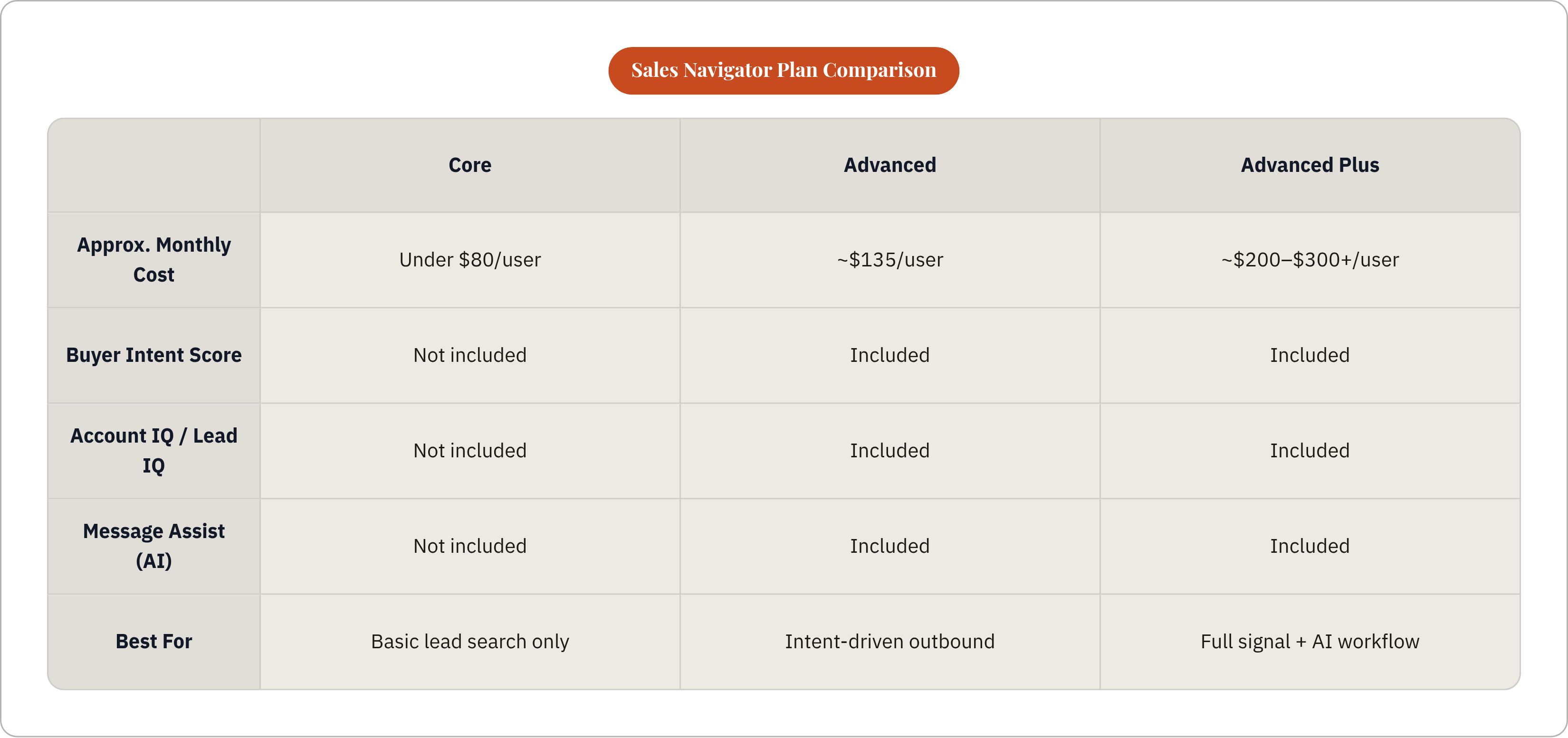
One access note that trips people up: Buyer Intent data lives on the Advanced tier (around $135 a user per month) and Advanced Plus (roughly $200 to $300-plus). The Core plan, at under $80, doesn't get you any of it. If you're on Core and wondering why your intent tab looks empty, that's why.
How to use Account Hub as a daily prioritization tool
Account Hub is where all of this stops being theory and turns into a to-do list. It pulls account insights, buyer intent, and relationship intelligence into one screen.
My habit, and the one I'd push on anyone doing outbound: open Account Hub first thing, before email, before anything else. Filter by "high and moderate buyer intent" and "growth alerts." That's your call list for the day, built fresh from today's activity.
Growth alerts catch hiring spikes, funding rounds, and expansion moves, which are really just proxies for one thing: budget showing up somewhere. High and moderate intent scores catch accounts where several signals have fired close together in time. Put those two filters side by side and you get a ranked set of accounts worth touching this week, each one with a reason attached to why it surfaced, an account that's actually doing something.
One catch, and it's a big one: the score tells you to look, not to dial. That distinction is the whole next section.
Where intent signals mislead and how to read them with judgment
Here's the ambiguity nobody puts on the sales page. LinkedIn's algorithm can't tell the difference between someone about to sign a contract and someone doing competitive benchmarking for a slide deck their boss asked for. Both look like "engagement" from the outside.
There's a stranger wrinkle too, one that catches reps off guard: outreach itself can inflate the score. If you view 20 profiles at one account in a week, hunting for the right contact, you may have just nudged that account's intent score up yourself. Congratulations, you created a signal out of your own curiosity. It's a bit like checking your own pulse, then getting excited that your heart's beating.
"High intent" is a threshold, a pile of activity that crossed a line someone at LinkedIn drew, and the same cluster of behavior means something different depending on what you sell. A stack of profile views and a pricing page visit might mean a lot for a low-cost-per-seat point solution and mean very little for a six-figure platform deal that needs sign-off from five departments.
Before acting on a signal, run it through three questions:
Is the activity coming from one person, or is it showing up across several people at the account? Is there a plausible business reason behind it, a funding round, a new VP, a reorg, something that explains why interest would spike right now? And does anything in your CRM back this up, any prior touch, any past conversation that lines up with what you're seeing?
Intent signals narrow the field. They tell you where to look and roughly when, and pair with the qualifying conversation and the account's history rather than standing in for either.
Reading intent at the account level, not the individual lead
B2B deals aren't decided by one person clicking "like" on your post. Most purchases pull in somewhere between six and ten stakeholders spanning procurement, finance, end users, and whoever signs the check at the top; LinkedIn's own numbers put the average deal at around 11 decision-makers involved. One profile view from one person is noise. The same behavior showing up across several people in a tight window is signal.
Picture this: a VP of Sales visits your pricing page on a Tuesday. Three days later, a Director of Revenue Operations downloads your integration guide. The following week, a CFO shows up on your webinar registration list. All inside two weeks. That's a buying committee waking up at the same time, and it's worth moving on fast.
This is where multi-threading stops being a nice idea and becomes the only defensible strategy. More than 40% of stalled deals die from indecision inside the buying committee, not from losing to a competitor. Committees stall because nobody in the room could get everyone to agree, and if you've only talked to one of them, you have no way to help unstick that.
Practically, this means using the account view in Sales Navigator to track which titles are lighting up, not just whether the account's overall score crossed a threshold. Save the account. Map out who matters across procurement, finance, the end-user team, and the executive layer. Save each of them as a lead and watch their activity show up in your feed over time. You're tracking a room, not one person.
Job changes as a high-conversion prospecting trigger
New hires are, for about 90 days, a blank slate. No vendor loyalties yet, no existing relationships to protect, and usually a boss somewhere asking "so what have you changed so far?" That combination makes a fresh executive one of the highest-converting targets on the entire platform.
A few patterns show up over and over. A new VP of Sales walking into a company that's scaling fast is almost certainly kicking the tires on the sales tech stack. Someone moving from a big enterprise into a startup usually wants leaner tools, fast, because the enterprise suite they used before is overkill and over budget. A manager just bumped up to director needs a quick, visible win to prove the promotion was deserved.
The data backs the instinct: job changers and people who've posted recently convert three to four times faster than dormant profiles that haven't touched LinkedIn in months.
Setting this up inside Sales Navigator isn't complicated. Turn on the Job Change alert filter in Account Hub and on your saved leads. Build a saved search combining target titles at target accounts with the "changed jobs in last 90 days" filter. Then move fast, because the window narrows by the week; outreach inside the first 30 days lands very differently than outreach at day 80.
And skip the "Congrats on the new role!" message. Everyone sends that, nobody remembers it. Acknowledge the move, then connect what you sell to whatever that new title's first 90-day priorities probably look like.
Using competitor signals to intercept buyers mid-evaluation
A buyer already comparing vendors has done half your job for you. They got the budget approved. They built a shortlist. Somebody internally already agreed this is worth spending money on. All that's left is convincing them you belong on the list, which is a much easier conversation than convincing someone a problem exists in the first place.
Sales Navigator's Technologies Used filter shows you which companies are currently running a competitor's product. Stack that with revenue, headcount, and title filters, and you've narrowed a huge market down to a short list of the right accounts with the right people to call.
Timing matters more than people think. Most B2B contracts renew once a year, and buyers usually start shopping alternatives roughly 90 days before that renewal date. That's the window. If third-party intent data shows an account reading comparison content or searching a competitor's name, that account just told you, out loud, that it's shopping.
Customer success teams should be watching this too, not just sales. If buyer intent data shows one of your own customers suddenly researching alternatives, that's churn risk showing up months before the cancellation email lands. Catching it early beats a save call after the decision's already made.
The account-level tell to watch for: several people at a competitor-using account engaging with your content or company page inside a short stretch of time. When you see that, skip the feature pitch. Lead with the specific pain point that actually drives people to switch vendors in your category, and open with something like a comparison guide, an ROI calculator, or a migration resource rather than a sales deck. And reach more than one person at the account at the same time. Talking to one contact while five others are also evaluating you is how deals slip through.
Sales Navigator won't tell you which prospects are reading competitor comparisons or pricing pages off-platform. That's a real gap, and it's part of why some teams layer in additional tools that track off-platform content consumption and route it back to sales as a follow-up signal, connecting the dots LinkedIn's own data can't reach on its own.
How AI features in Sales Navigator change research and outreach prep
Old workflow: rep has five calls booked for the day, spends 20 to 30 minutes per account digging through the news tab, the company page, and whatever else they can find before each one. That's two and a half hours of research to have five conversations. Nobody has that kind of time, and most reps skip the research instead, which is worse.
Account IQ compresses that into roughly a two-minute read: company profile data, recent activity, and public web signals pulled into one structured summary. Lead IQ does the same thing at the individual level, role history, recent posts, mutual connections, and a guess at what that person's priorities probably are right now.
Message Assist takes both of those and drafts a first-touch InMail that actually references something real, a recent profile view, a piece of content someone engaged with, a title change, instead of opening with "I hope this finds you well."
The edge here is structural. Message Assist is built directly on LinkedIn's own signal set, and no outside enrichment tool or scraped-profile vendor sees LinkedIn engagement data this close to the source.
One honest caveat: the draft is a starting point, not something you should send as-is. Generic AI phrasing is recognizable now, and buyers notice it fast. Read the draft, add your own voice, cut the parts that sound like a robot wrote them (because one did), and then send it.
Account IQ, Lead IQ, and Message Assist all sit on Advanced and Advanced Plus. Core doesn't get them, same as the Buyer Intent Score.
Why seller credibility on LinkedIn amplifies everything the signals surface
At any given moment, roughly 95% of your target market isn't buying anything. Intent signals help you find the 5% who are. But finding them doesn't mean they'll respond to you, because before they reply to a cold InMail, they check who's sending it.
According to the 2025 Edelman-LinkedIn B2B Thought Leadership Impact Report, drawing on close to 2,000 professionals globally, 55% of decision-makers say they use thought leadership to vet organizations before working with them, and 54% say strong thought leadership prompted them to look into products or services they weren't already considering.
There's a group most reps never even think about: hidden buyers, the finance, legal, and procurement people who never show up in your CRM but absolutely influence the deal behind the scenes. In that same report, 95% of hidden buyers say strong thought leadership makes them more receptive to sales and marketing outreach.d strong thought leadership made them more open to a vendor's outreach, and 79% said they'd advocate internally for a vendor during an RFP if that vendor put out consistently good content.
So here's the sequence that actually plays out. A signal fires. A rep reaches out. And the buyer, before replying, clicks through to that rep's profile. If it's three posts old from 2022 and looks like a digital resume, the outreach is already dead, no matter how well-timed the signal was. Sellers who show up consistently on social outsell the ones who don't, by a wide margin, and that gap starts well before the first message gets sent.
Before working intent signals seriously, get three things in shape: post regularly about topics your buyer's role actually cares about, keep your profile reading like a practitioner's take rather than a resume or a pitch deck, and engage on your prospects' and peers' posts so your name looks familiar before you ever show up in their inbox.
Building the content infrastructure that makes intent signals convert
Personal profiles beat company pages on distribution, it's not close. Content from a founder or a seller reliably outperforms the same message posted from the brand account, so the smart setup coordinates the two: company page for the record, personal profiles for the reach.
Format matters more than most teams realize. Going into 2026, multi-image carousels and native documents are the strongest performers on LinkedIn for engagement, video pulls in solid reach, and plain link posts consistently underperform everything else. A lot of B2B teams are, without realizing it, publishing in exactly the format the platform rewards least.
Here's the connective tissue: the buyer reading your thought leadership today, before they're anywhere near a purchase decision, is the same buyer who'll show up in Account Hub with a high intent score three months from now. The content feeds the pipeline.
Most teams keep these two systems apart, Sales Navigator data on one side of the org chart, a content calendar on the other, with nothing connecting the two. Nobody knows which piece of content a given prospect engaged with, so nobody follows up referencing it, and the whole thing feels like a coincidence instead of a system.
A connected version looks like this: marketing builds content around real buyer pain points and honest competitive comparisons. Sellers share and engage with that content under their own names to build recognition. Intent signals, from LinkedIn and from wherever else a prospect shows up online, route to the rep who should own that account, with context attached. And outreach references the actual content or signal that triggered it, not a generic "just checking in."
This is the gap that connecting content production and distribution directly into sales follow-up is built to close: flagging which in-market buyers are engaging with what, surfacing competitor-related intent beyond what Sales Navigator sees on its own, and giving reps the specific context they need to reach out like they've actually been paying attention. Because at that point, they have.