Using LinkedIn Alerts to Monitor Champion and Buyer Movements
Track job moves for champions and buyers before your competitors do.

Every B2B sales floor has that CRM. The one with 4,000 contacts, half of whom haven't worked at their listed company in two years. That's a math problem rather than a data entry problem. Median employee tenure sat at 3.9 years as of January 2024, per a national labor statistics agency. The cohort filling manager and director seats, the ones actually evaluating vendors, sit between 25 and 34 years old, with median tenure of just 2.7 years. Compare that to workers aged 55 to 64, who stick around a median of 9.6 years. Decision-makers leave fastest, so the list built last quarter is already half wrong, and pretending otherwise just wastes a rep's morning.
Most teams treat a job-change alert and champion tracking as the same thing. They're not, and that mix-up is exactly how good reps burn out on notifications they've learned to ignore.
A job-change alert fires whenever any contact's employment status shifts on LinkedIn. New title, new company, new headline, ping. That feed can throw off hundreds of alerts a quarter for a mid-size book of business, and most mean nothing to a rep's pipeline. Champion tracking is the judgment layer on top of that noise, narrowing it down to moves that actually touch revenue. Champify's 2025 Impact Report found CRMs are missing 78% of former champions who made qualified job changes. Of the ones still logged, many had never been tagged as champions to begin with. The record existed. Nobody flagged the person as worth watching. That gap, tagging over tracking, is the whole game.
Four groups deserve tighter attention than everyone else sitting in the CRM. Champions from closed-won deals already trust the product and lived the outcome. Champions from closed-lost deals now sit at a new company where the old objection (budget, timing, a skeptical boss) may no longer apply. Power users who got promoted into a decision-maker seat pair hands-on product knowledge with actual budget. And contacts leaving a competitor's account have seen a rival tool up close and might want a second opinion.
None of this works unless someone sits down and tags who counts as a champion inside the CRM first. Skip that step and the alerting system hands reps volume instead of signal, and volume without relevance gets ignored inside a month. Guaranteed.
Here's the part most well-run programs still miss: a job-change alert is not a usable contact. The old work email is a bounce waiting to happen. The real sequence runs from confirming the move, to enriching the new company's data, to identifying the correct domain, to verifying a safe-to-send address, and only then does outreach go out. Skip the verification step and tracking is just busywork wearing a system's clothes.
How LinkedIn Sales Navigator surfaces champion and buyer movements
The mechanic underneath all of this fits in one sentence: save someone as a lead in Sales Navigator, and the platform watches their profile, flagging job title changes, company moves, and headline edits as they happen.
A few alert types matter more than the rest for pipeline work. Job change alerts carry the highest ROI in the product; per data from getgangly.com, it's the signal most correlated with reply rates above 15%. The "Job Changers in ICP" filter combines a buyer persona with a "Changed Jobs Past 90 Days" flag, useful for catching people who just landed in a role with fresh budget to spend. "Senior leadership changes in the last 90 days" and "Recent department headcount growth" narrow a broad ICP list down to accounts most likely mid-buying-cycle right now. And Relationship Explorer surfaces up to eight relevant unsaved leads per account based on a chosen persona.
As of 2026, Sales Navigator also tracks more than 180 behavioral signals, rolling them into a single Buyer Intent Score. Per getcleed.com, early adopters filtering by that score report conversion gains of up to 30%. The same source says the platform can now draft InMails, summarize accounts, and take plain-English search queries.
Pricing runs Core at $119.99 a month and Advanced at $159.99 a month. CRM sync, though, needs the Advanced Plus tier, and that detail matters far more than it sounds like it should. It gets its own section further down.
Worth flagging now, because it matters later: the Buyer Intent Score is categorical. It tells a rep a prospect is showing elevated buying intent based on aggregated behavioral signals. It won't tell a rep that same prospect just commented on a competitor's launch post, or typed "we're looking to switch tools" in a LinkedIn thread. That gap matters once the conversation turns to stacking signals.
The 48-hour window that determines whether an alert becomes a meeting or a missed opportunity
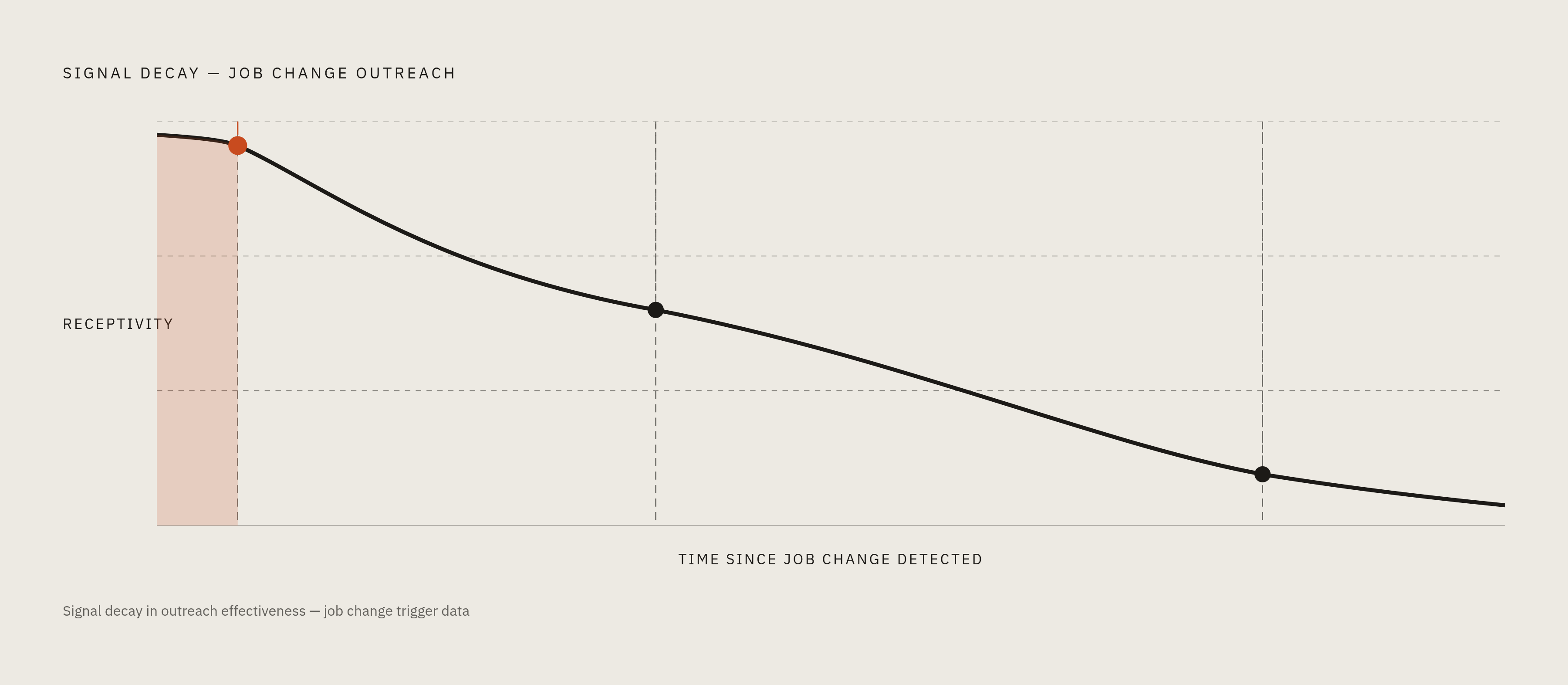
Job-change signals decay fast, on the order of 72 hours, and the numbers back up exactly how much that decay costs. Per getgangly.com, reps who act on a job-change alert within 24 hours book 3.4 times more meetings than reps who let alerts pile up and batch them weekly. LinkedIn's own research backs this up: decision-makers run 62% more receptive to outreach right after a job change. Reach out within two weeks of the move and reply rates climb by up to 45%, according to LinkedIn research cited by Boomerang AI.
The window exists for a plain reason. Someone walking into a new director or VP role usually carries a mandate to shake things up, to bring in tools that worked at their last stop. They owe the incumbent vendor nothing, and they've got the political capital to make a change stick. Established employees stall on vendor decisions because sticking with the familiar carries no risk. New hires face the opposite pressure. They need a quick win to justify the hire, and that pressure can compress a sales cycle from months down to weeks. Call it the honeymoon window: the first 90 days when a new hire is actively rebuilding their stack and hasn't yet inherited anyone else's loyalties.
Reps managing 50 to 115 accounts, a range cited by ZoomInfo, cannot manually watch every contact for a job change. By the time a move gets spotted by hand, a competitor's rep may have already sent the first message. The 48-hour window really comes down to three things happening on time. The alert routes to the right rep automatically, a defined play kicks off with a named owner attached, and enough context arrives that the first message doesn't read like a form letter. A notification sitting unread in a dashboard does nothing, which makes it functionally identical to no notification at all. Two months later, that same signal is just cold outreach wearing a job-change costume.
Four plays that convert, and how to route each one before the window closes
Play 1: re-engage former champions at their new company. The trigger is simple: someone who championed a closed-won or closed-lost deal shows up at a new employer. Per Boomerang AI, champion mobility converts at over 60% from intro to meeting, against roughly 1% for cold outbound, with sales cycles running 40% shorter and response rates 2 to 4 times higher. Champify's 2025 report found deals involving a contact with prior product experience closed at 37%, against 19% for deals without one. UserGems data, cited by Allegrow with a note to treat it directionally since it's vendor-sourced, puts past buyers who've changed jobs at three times more likely to buy than an average lead. Route this by looping in the original AE before anyone sends a message, and prioritize champions who were most deeply embedded in the previous deal. Watch the rest of that old buying committee too. It's also worth watching whether other contacts from the same buying committee show up at new accounts over time.
Play 2: protect an account when a champion leaves. If a saved lead inside an active customer account changes jobs, treat that as a renewal flag, not a curiosity. The person who fought for the deal internally, who spent political capital defending the contract, just walked out the door. A champion exit inside the 90-day renewal window belongs at the top of the queue, and layering in product usage data sharpens it further: flat usage plus a departed champion together sharpen the picture of renewal risk. The counter-move is briefing the replacement on the original business case fast, before they get the chance to shop around. They weren't in the room for the first pitch and have no reason to assume the deal still makes sense.
Play 3: intercept new decision-makers landing in ICP accounts. A new VP of Sales or CTO joining a target account, caught through the "Senior leadership changes in last 90 days" filter, often arrives with an explicit mandate to change things. Vendor conversations suddenly land on the new leader's radar. Research the new hire's previous role before the first message goes out, to get a sense of what they're likely trying to prove, and pair that with hiring activity at the account. Multiple new hires landing in the same department in a short window is often a tell that budget just got reallocated.
Play 4: stack a job change with a second signal. On its own, a job change marks a single moment in time: the person already moved, and the window is already narrowing. Combine it with something happening at the same time and it turns predictive instead of reactive. Strong combinations include a job change plus a rising intent score, a job change plus hiring activity in roles that typically touch the product, and a job change plus expanded engagement with the product category on LinkedIn. Per Boomerang AI, the sweet spot for outreach sits 30 to 60 days after the move gets announced. Earlier reads as opportunistic. Later, someone else already had the conversation.
All four plays share one non-negotiable: the alert has to land in a CRM record or a Slack channel with a named owner and a task attached. Anything less, and it's a notification gathering dust in a dashboard nobody opens twice.
Where Sales Navigator's native alerts end and the broader signal stack begins
Sales Navigator is a solid starting point, not a finish line. Teams that treat it as the whole solution are exactly the ones who get stuck. Its intent score, again, is categorical: it flags research activity within a product category but stays blind to sharper signals, like a prospect commenting on a competitor's product launch or typing "we're evaluating alternatives" in a LinkedIn thread. Per scaliq.ai, competitor engagement on LinkedIn is one of the fastest ways to spot a genuinely in-market buyer, but catching it means watching activity at the post level, not just tracking profile changes.
There's a bigger gap sitting underneath all of this. Pulling contacts by job title and industry filters alone tells a rep nothing about whether an account is actually feeling the pain the product solves right now. Job-change signals add timing. Competitor-engagement signals add specificity about intent. Per goextrovert.com, signals from a professional networking platform (job changes, posts, champion movements) come identity-resolved from the jump, meaning a named person tied to a named company on a specific date. Web-based intent signals, by contrast, show a company researching a topic anonymously, and someone still has to do the legwork of finding the right person to contact.
A handful of tools fill in what Sales Navigator leaves out, and they don't all solve the same problem. Extrovert pairs LinkedIn buying signals with a built-in engagement workflow, so detection and the suggested response live in one place (per goextrovert.com). Trigify offers rule-based alert routing across more than 30 trigger types, including job changes and keyword-level activity, with a TrigIQ assistant suggesting personalized outreach and native integrations into HubSpot, Salesforce, Clay, and Smartlead (per clearcue.ai). Clay builds a custom signal stack from more than 50 data providers and routes the output into whatever outreach tool a team already runs (per goextrovert.com). ZoomInfo's job-change alerts run identity-resolved across its GTM Workspace, GTM Studio, Copilot Signals, and Tracker products, built on verified data with defined routing rules (per pipeline.zoominfo.com).
Teams running high volume on champion tracking specifically lean on dedicated platforms too. Boomerang AI, for instance, automates CRM updates, triggers re-engagement emails or tasks, maps relationships across platforms, and flags at-risk deals. The Armis case, cited by Boomerang AI, involved more than 26,000 warm-intro paths activated, a 10x return on investment in the first year, and over 1,400 hours of manual research cut out entirely.
Buying everything on the list is usually a sign nobody diagnosed the actual gap first, rather than a mandate to buy everything on it. The right stack depends on which hole, timing, specificity, or routing, is costing pipeline right now. Sales Navigator remains the reasonable starting point for most sales teams. Figure out which gap it leaves open for a given business, then plug just that one.
Making alerts operationally durable: CRM sync, workflow routing, and the write-back gap
A lot of RevOps teams buy Sales Navigator and assume the CRM problem is solved. It isn't, not automatically, and not without extra work.
CRM integration in Sales Navigator is gated by tier. Embedded profile views need Advanced or Advanced Plus. Full, two-way CRM sync needs Advanced Plus specifically. That tier integrates with Gong, HubSpot Smart CRM, Microsoft Dynamics 365, Microsoft Power BI, Oracle Sales, Outreach, Salesforce, and Tableau, per LinkedIn's own documentation. LinkedIn also cites a Forrester study, commissioned in October 2023, claiming the integration saves 15 minutes per user per day by cutting down on tool-switching.
The catch that trips people up most is that what actually writes back into Salesforce is activity metadata, InMails sent, messages received, connection requests, Smart Link views. LinkedIn profile data shows up visually inside Salesforce through Embedded Experiences, but per pipeline.zoominfo.com, it doesn't transfer into actual CRM fields usable for reports, routing rules, or automated workflows. In practice, a job-change alert cannot natively spin up a Salesforce task, kick off a sequence, or reroute a territory assignment on its own. The data shows up. It just doesn't do anything unless a human, or a piece of middleware, tells it to.
So teams that want alerts to auto-create tasks, launch sequences, or update deal records need one of two things: Advanced Plus paired with a middleware layer, or a third-party platform built to write straight into CRM fields. Skip that step, and the alert becomes a screenshot: interesting to look at, useless for automation.
The verification step from earlier belongs here too, since it's the part most playbooks skip entirely. A detected job change is not yet a safe contact to email. The old address is a bounce risk sitting in a queue. The full operational path runs from confirming the move actually happened, through enriching the new company's data, identifying the right domain, and verifying the new address, before any message goes out the door.